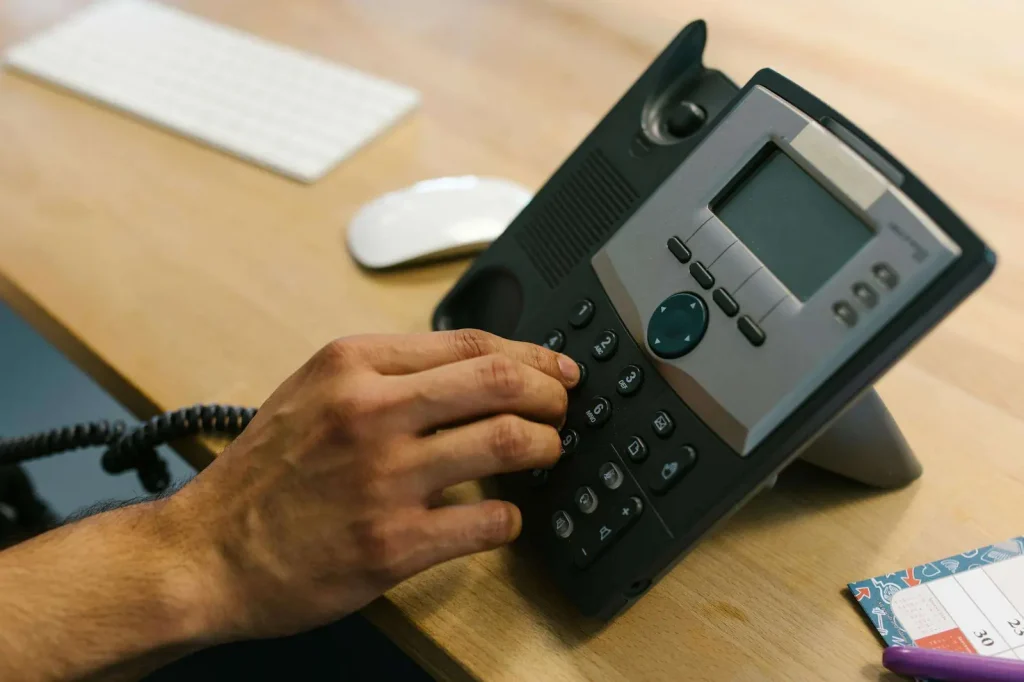
A VoIP phone is any device that makes calls over the internet using Voice over IP technology, rather than a traditional phone line. VoIP phones range from desk hardware to apps on your existing devices.
If you have ever made a phone call through a video-meeting app, a team chat app, or a softphone application instead of a physical desk handset, you have already experienced the flexibility of Voice over IP. While hardware models look and feel exactly like a standard office desk setup, shifting the underlying network layer from copper wires to broadband internet completely changes your communication capabilities.
This architectural change unlocks advanced software features such as virtual number assignments, automated voicemail-to-email routing, video conferencing, native CRM integrations, and the freedom to manage your entire business communications footprint from any global location with internet access.
What Is a VoIP Phone?
A VoIP phone, or Voice over Internet Protocol phone, is an endpoint device or application engineered to translate voice signals into digital data packets for real-time transmission over an internet network.
Unlike traditional analog devices that must physically plug into a localized telephone wall jack or an on-premises PBX closet, a VoIP phone registers directly with an internet-based cloud communications provider. Because these endpoints are entirely software-defined, they are highly versatile and take several operational forms.
Dedicated IP desk phones are physical desktop hardware that looks like a traditional phone but plugs directly into your internet network via Ethernet or Wi-Fi. Desktop softphones are secure applications installed on a computer or laptop, turning your computer into a full-featured communication hub. Mobile VoIP apps are dedicated smartphone applications that run your professional business lines seamlessly over Wi-Fi or cellular data lines. Web-based dialers are browser-based interfaces that let you make calls directly inside web platforms without downloading any software.
With a virtualized setup, your business phone number is completely decoupled from physical geography. Calls can ring a physical desk phone, a laptop app, and a mobile phone simultaneously, ensuring distributed workforces and remote teams stay perfectly aligned.
VoIP vs. Traditional Phone Systems
The main difference between a VoIP configuration and a legacy landline system is the underlying transit medium. Landlines use dedicated copper lines installed and maintained by local telecommunications utilities at a fixed physical address. VoIP phones bypass this rigid network entirely, routing digital data packets over your existing business broadband.
This fundamental infrastructure shift removes major cost barriers. Businesses no longer need to buy or service expensive on-premises private branch exchange hardware systems, pay separate phone line installation fees, or call out technicians just to add a new employee line.
Here is a detailed comparison between VoIP and landline phones. VoIP phones support PSTN phone calls, include nationwide long-distance as standard, allow free user-to-user internal calls across global offices, include caller ID and call waiting as standard, and offer a five-star plug-and-play setup experience. They require internet access at approximately 100 Kbps per line, support Wi-Fi, DECT, and Bluetooth headsets, automatically reroute calls to mobile apps during outages, use IP Telephony with SIP, TLS, and SRTP, deliver five-star HD audio quality, have an average setup cost of zero dollars when using existing laptops or phones, start at twenty to forty dollars per user per month, have no activation fee, include automated auto attendants and hunt groups as standard, are fully remote-work capable via native softphone apps, and offer native integrations with CRMs, team chats, and help desks.
Landline phones support PSTN calls, often charge extra for long-distance, require local PBX hardware for internal calls, vary in caller ID and call waiting features by carrier package, and offer a two-star setup experience requiring custom wiring. They do not require internet, support only DECT and Bluetooth hardware, drop calls completely during outages, use analog voice signals, deliver three-star narrowband audio quality, cost approximately one hundred ten dollars per physical wall jack to set up, start at fifty dollars or more per analog line per month, charge fifty dollars per account line for activation, require expensive legacy PBX add-ons for auto attendants and routing, are hardwired to a single location, and offer no native software integrations.
How Does a VoIP Phone Work?
A VoIP phone routes voice traffic across the web by establishing an active digital link with your cloud service provider. The underlying process occurs instantly and seamlessly behind the scenes.
Endpoint service registration occurs when the IP phone or application is powered on and securely authenticates with your cloud service provider using your unique account credentials, letting the network know exactly where to route inbound traffic.
Call initiation and signaling takes place when a number is dialed and the phone transmits a digital request via SIP, or Session Initiation Protocol, to build the active call session. If the recipient uses a legacy landline, the cloud network seamlessly bridges the call through an automated gateway to connect with the traditional PSTN.
Voice packetization happens as you speak, when the device uses specialized software algorithms called codecs such as G.711 or Opus to instantly compress your analog voice waves into tiny digital data packets.
Real-time data transit moves these data packets dynamically across the internet over standard IP networks, optimizing bandwidth usage in real time.
Audio reassembly occurs at the receiving hardware or software endpoint, which captures the arriving data streams, reorders any out-of-sequence packets, and converts them back into high-definition analog audio.
Benefits of VoIP Phone Systems
VoIP systems replace the limitations of traditional phone lines and on-site PBX hardware by routing calls over the internet. That gives businesses more flexibility, richer calling features, and simpler management, all without relying on physical phone wiring.
Here are the top benefits of using a VoIP phone system.
Streamlined setup and integration bypasses complex physical installations. The entire system deploys over your existing broadband connection and integrates natively with popular collaboration suites and CRM sales tools.
Dynamic number linking allows organizations to create virtual regional phone numbers anywhere. You can easily link multiple regional numbers directly to specific users, hunt groups, or departments while keeping your original phone numbers through free number porting.
Professional mobility enables employees to make and receive calls on laptops, desk phones, or mobile apps interchangeably while maintaining a singular corporate caller ID.
Advanced inbound management delivers sophisticated calling tools as standard, including multi-level auto attendants, smart call routing configurations, automated voicemail-to-email delivery, and built-in video conferencing rooms.
Scalability and financial ROI allow you to scale your line presence up or down instantly through a cloud dashboard without scheduling technician house calls or buying on-premises server equipment, significantly lowering ongoing maintenance overhead.
Businesses like VoIP because it is easier to scale compared to traditional landlines and allows you to add phone numbers as your team grows. VoIP has easy installation because you do not need technicians to come out to install physical phone lines. You only need an existing broadband connection and a VoIP provider.
Note: Sometimes businesses prefer to retrofit an existing PBX to a cloud-based system rather than switching entirely to a VoIP phone system. This type of migration relies on SIP trunking to connect phone calls over IP networks. SIP is commonly used as a control protocol in VoIP technology, ensuring efficient call management and connectivity.
VoIP Phone Equipment and Top Picks for 2026
VoIP phone equipment generally falls into two categories: hard phones, which are dedicated physical desktop handsets, and softphones, which are software apps running on computers or smartphones. Most growing organizations use a mix of both to fit individual employee workflows.
If you choose Cytranet for your cloud phone system, you will get a softphone included in your package. Cytranet also offers a variety of certified VoIP phones and equipment guaranteed to work for your needs.
Best Picks for VoIP Phones
We have assembled a list showing the most popular VoIP phones on the market to make the decision process easy. All of these models have been tested and reviewed, and each has been benchmarked to the highest industry standards.
A mid-range IP desk phone suited for knowledge workers and multitasking staff. It features a four-line color display, clear audio, and dual Gigabit Ethernet ports, with an estimated retail price of one hundred sixty dollars.
The Cytranet X-885 is an IP desk phone designed for executives and busy office receptionists. It features a twelve-line high-resolution display and twelve programmable speed-dial keys, with an estimated retail price of one hundred ninety dollars.
A premium touchscreen IP desk phone built for executive suites and premium offices. It features an adjustable seven-inch touchscreen, integrated Bluetooth 4.2, and dual-band Wi-Fi, with an estimated retail price of three hundred ten dollars.
A wireless conference phone suited for small to mid-sized meeting rooms. It features an omnidirectional base microphone, two detachable wireless microphones, and smart noise reduction, with an estimated retail price of three hundred eighty-nine dollars.
A mid-size conference phone designed for medium corporate boardrooms. It features a color LCD touchscreen, a fourteen-foot voice pickup range, and USB and Bluetooth support, with an estimated retail price of seven hundred forty dollars.
A large-room conference phone built for large executive meeting rooms. It features an advanced color touch interface, a twenty-foot wideband pickup, and multi-network Wi-Fi, with an estimated retail price of nine hundred dollars.
What Type of VoIP Phone Does My Business Need?
In the end, you cannot go wrong with any of these popular devices. You will notice that each offers the features you would expect from a phone system.
Here are the primary requirements to consider before choosing a device.
Consider the brand reputation. Think about longevity and past performance and whether there are names you trust more than others. Several established hardware makers have long track records in business communications and are recognized leaders in the VoIP hardware market, with reputations for producing high-quality, reliable devices that have stood the test of time. When you evaluate any serious VoIP solution, it is worth including proven, well-reviewed handset and conference-phone lines from reputable vendors in your decision-making process.
Consider the number of line registrations. How many lines does each VoIP phone in your office need to handle? Some team members will need many more than two lines. Likewise, look at how many line appearances you can see on the screen so you know if another user’s line is available.
Consider whether you use headsets. What type of connectors do they have? An RJ-9 is a familiar type of connector for telephones but is less popular today. Today’s headsets use USB for connectivity. If you need Bluetooth, make sure your device supports it. Some devices require a USB-to-Bluetooth dongle that might not be included.
Consider Power over Ethernet, or PoE. Most Voice over IP phones now support PoE, but make sure you have the power adapters since most employees working from home do not have PoE-capable network equipment. Cloud VoIP services simplify management, enabling faster onboarding and easier user management, which is especially beneficial for remote or hybrid work setups.
Do not forget about reliability. Does the phone receive regular security updates?
VoIP phones that receive these updates tend to be more reliable than devices that need firmware delivered by hand. Many internet-connected devices never get updated, so this is an important consideration.
Growth Starts With Reliable Communications: Cytranet VoIP
Behind every successful sale, client support call, and strategic discussion is a reliable business phone system. When your business depends on staying connected, Cytranet’s flexible VoIP platform empowers your team to work from any location, scale on demand, and deliver an exceptional customer experience.
With Cytranet’s cloud-native solution, you can quickly add new users, build out smart call routing paths, and sync your communication history with your daily business tools, completely bypassing complex hardware management. Preconfigured desk phones or intuitive softphone apps get most teams up and running in minutes.
Speak with a Cytranet specialist today to design a communication framework that supports your business now and adapts to your growth tomorrow.
VoIP Phone FAQs
Got questions about VoIP? You are not alone. Here are answers to the most frequently asked questions about VoIP phones.
How do I set up a VoIP phone system?
Setting up a VoIP phone system is straightforward. First, verify that your broadband internet connection has sufficient bandwidth, roughly 100 Kbps per active concurrent call. Next, select your ideal Cytranet subscription plan and log in to your online administration dashboard. From there, you can configure your inbound routing paths, create auto attendants, and instantly activate softphone links for your team’s computers or plug physical IP phones directly into your network ports.
Can I transfer my phone number to VoIP?
Yes. You can preserve your established numbers through a standard regulatory process called number porting. When moving to Cytranet, you simply provide your current business numbers alongside your old utility account details, and the porting team handles the carrier-to-carrier transfer behind the scenes. Keep your old telephone service active until this transfer is finished to prevent any service interruptions.
Do I need to buy a physical desk phone to use a VoIP service?
No. Cytranet allows you to run your phone service entirely via software endpoints called softphones. By downloading the native app on your desktop, laptop, tablet, or smartphone, employees can make or receive clear, secure corporate calls using their computers or cell phones without needing separate hardware.
Can a VoIP phone receive text messages?
Yes. Cytranet’s business phone plans include full support for automated text messaging. This allows your team to send and receive professional SMS and MMS multimedia messages directly from their business phone lines using their desktop softphones or mobile dashboards. Note that under industry guidelines, numbers must be registered via a quick 10DLC, or 10-Digit Long Code, verification process to clear carrier spam filters.
Can I use a physical VoIP desk phone with a different service provider?
Yes. Because modern IP desk phones run on open, standardized signaling guidelines like SIP, you can typically repurpose and reconfigure your existing physical phones when switching to a new provider. Onboarding your old phones to a new network simply involves modifying the phone’s system settings with your new service credentials, protecting your hardware investments.
What are the advantages and disadvantages of VoIP phones?
VoIP phones with Cytranet deliver significant advantages including lower costs on long-distance and international calls, complete mobility to make and receive calls anywhere with an internet connection, and advanced features like voicemail-to-email, video conferencing, call forwarding, and integrations with your email or CRM software. The call quality is sharper and delivers high-definition audio so that everyone can hear you clearly.
How secure are VoIP phone systems?
Modern VoIP systems are built with multiple layers of enterprise security. Cytranet safeguards your corporate voice paths using top-tier encryption standards, deploying TLS, or Transport Layer Security, to prevent call data tracking and SRTP, or Secure Real-time Transport Protocol, to encrypt active audio streams. This is backed by continuous 24/7 network monitoring, secure firewalls, and ISO/IEC 27001 certified data center facilities. Choosing Cytranet means selecting a trusted provider dedicated to safeguarding your business communications.
Talk to Cytranet About Your Business Connectivity
Cytranet is a Las Vegas-based licensed telecommunications carrier providing dedicated fiber internet, fixed wireless, business VoIP and hosted PBX, managed Wi-Fi, colocation, and two-way radio solutions to businesses, nonprofits, and government organizations across Nevada, Arizona, California, and the broader Southwest. To discuss your needs with our team, call 702-846-5000 or email info@cytranet.com.
Talk to Cytranet
A business-only carrier for fiber internet, cloud voice, managed Wi-Fi, and managed IT. Start with a free technology evaluation.